You can spend months improving your website and paying for traffic, then lose a promising enquiry because nobody replies at the right time. The visitor was interested. The next step simply never happened.
Affiliate disclosure: This article contains affiliate links. If you purchase through them, Palena Digital may earn a commission.
GoHighLevel is built to help you manage what happens after someone shows interest. It brings your CRM, messages, sales pipeline, appointment booking and marketing automation into one platform, with AI tools for selected conversational tasks.
That combination has particular appeal for digital agencies, consultants and local businesses. You can give each enquiry a place to go, assign someone to handle it and build a follow up process around the service you sell. Agencies can manage the same work across separate client accounts.
This GoHighLevel review covers pricing, the features that deserve your attention, realistic use cases and the costs to include in your budget. You will also find practical advice on WordPress integration, AI and choosing a plan. The aim is to help you decide where the platform could earn its place in your business.

GoHighLevel review: Is it worth it?
GoHighLevel is worth serious consideration if your business needs a connected system for turning enquiries into conversations, bookings and customers. Its strongest fit is an agency managing several client businesses or a service company with a sales process that needs consistent follow up.
The advantage comes from connecting the steps. A form submission can create a contact record, start a workflow, notify the right person and lead to a booking. You can follow that opportunity through the pipeline as the conversation develops. That gives the team a shared view of what needs attention.
My recommendation is to start with one process you already need to improve. Build the form, pipeline and booking steps around that journey, then see how they work together. If this is the system your business has been missing, a focused trial is a practical next step. Include setup, communication usage and any AI additions in your budget.
The standard trial lasts 14 days. Subscription billing begins afterwards unless you cancel, and communication or other usage charges can apply during the trial.
In this review
- The verdict.
- What is GoHighLevel?
- Who gets the most value?
- Plans, pricing and running costs.
- Where the business value appears.
- The features that matter in daily use.
- AI tools and allowances.
- Examples of connected customer journeys.
- Reconnecting with past enquiries.
- Agency accounts, Snapshots and SaaS Mode.
- Judging value against cost.
- Using GoHighLevel with WordPress.
- Customer feedback and support.
- Strengths and things to plan for.
- How the alternatives compare.
- Getting started and planning adoption.
- Frequently asked questions.
What is GoHighLevel?
GoHighLevel, also known as HighLevel or GHL, is an all in one customer relationship management and marketing automation platform. Its published capabilities include sales pipelines, email and SMS, calendars, forms, websites, funnels, reputation management, payments and AI tools.
Think about a visitor requesting a consultation. Their details need to reach your team. They need a useful response. Someone has to arrange the meeting and remember what happens afterwards. HighLevel lets you configure those steps around a contact record and a defined workflow.
The agency structure adds another dimension. You can organise client businesses in separate subaccounts, reuse selected configurations and, on the appropriate plan, sell access through SaaS Mode. That makes GoHighLevel relevant to both running a business and delivering a service to other businesses.
You do not need every feature on the first day. A clear contact pipeline, a working calendar and a handful of relevant messages can be a sensible starting point. The broader platform gives you options as the business develops.
Who is GoHighLevel best for?
Ask yourself how a customer moves from first contact to a buying decision. If the answer involves several conversations, appointments or proposals, GoHighLevel deserves a closer look. The platform has more to contribute when those stages need to work together.
| Business type | Where the value is most likely to appear |
|---|---|
| Agencies serving several clients. | A consistent way to organise client accounts, reuse selected setups and deliver ongoing support. |
| Local service businesses. | A clearer path from a quote request or phone enquiry to an appointment and an agreed job. |
| Consultants and coaches. | A connected process for qualifying interest, scheduling conversations and staying in touch with prospective clients. |
| Businesses with several team members or locations. | More consistent ownership, appointment handling and visibility across the relevant accounts. |
A consultant, for instance, may need to understand the prospect’s problem before recommending a service. The form gathers context. The booking page offers a suitable conversation. The pipeline shows whether a proposal is due. Each tool has a clear job within the same sales process.
For an agency, the question is also about delivery. Can your team build a useful process, document it and adapt it for the next client? If you serve businesses with similar requirements, HighLevel’s account structure and reusable configurations can support a more consistent service.
GoHighLevel pricing: Which plan should you choose?
GoHighLevel’s three main plans are Starter, Unlimited and Agency Pro. You can explore the current plans and trial options on HighLevel’s website. The following USD prices were checked on 16 October 2026.
| Plan | Monthly billing | Annual payment | Main distinction |
|---|---|---|---|
| Starter | $97 | $970 | Three subaccounts. |
| Unlimited | $297 | $2,970 | Unlimited subaccounts and supported phone/email rebilling without markup. |
| Agency Pro | $497 | $4,970 | SaaS Mode, automated account creation and supported phone/email rebilling with markup. |
All three plans advertise unlimited contacts and users. Annual billing requires payment upfront. The listed yearly subscription costs the equivalent of ten monthly payments, so compare that commitment with the flexibility of paying monthly.
Starter suits a focused first setup
Starter costs $97 a month and includes three subaccounts. It is the natural plan to examine for one business or an agency establishing its first few client setups. Choose it when the available accounts cover your requirements and your priority is getting the enquiry, booking and follow up process working.
Unlimited supports a growing client base
Unlimited costs $297 a month and removes the three subaccount limit. It also supports phone and email rebilling without markup. For a growing agency, the decision often comes down to client account capacity and how you want to allocate communication costs. You can build your service around one agency environment as the client base grows.
Agency Pro adds SaaS selling capabilities
Agency Pro costs $497 a month and adds SaaS Mode, automated client account creation and supported phone and email rebilling with markup. It is the plan to examine when selling access to the platform forms part of your business model.
Be specific about the offer before upgrading. A managed CRM service and a software subscription with automated account creation have different operating needs. Agency Pro makes the most sense when you intend to use its selling and provisioning capabilities within a defined service.
What should you budget beyond the subscription?
The subscription is the first line in the budget. Your total also depends on email, SMS, phone numbers, calls, selected AI products and optional services. Estimate those activities for the accounts you intend to run, especially before quoting an inclusive monthly client fee.
LC Email costs $0.675 per 1,000 billable email events. Incoming, outgoing and forwarded emails can incur charges. Email verification is separate at $2.50 per 1,000 verifications. Selected premium workflow actions can also generate execution charges.
| Illustrative setup | Calculation | Monthly subtotal |
|---|---|---|
| Starter plus 10,000 billable email events. | $97 + $6.75. | $103.75 |
| The same setup plus AI Employee Growth for one location. | $97 + $6.75 + $50. | $153.75 |
These calculated subtotals illustrate two configurations. They exclude SMS, calls, phone numbers, email verification, other optional services, processing fees, taxes and implementation time. Use your expected activity to build a complete budget.
Mobile branding is another separate decision. The white label mobile app is listed at $497 monthly, while the branded client portal app is listed at $49 per subaccount monthly. The white label mobile app fee and the Agency Pro subscription are distinct charges.
For an agency, decide which costs your service fee covers and which are passed through to the client. For a single business, check the usage report as you test. You will make a better plan choice with an estimate of real activity than with the subscription price alone.
If you have identified a suitable plan, use the trial to build the enquiry journey you most want to improve. A working form, pipeline and calendar give you something concrete to assess before committing to a wider setup.
How GoHighLevel can improve your enquiry process
Here is the commercial question behind the feature list: what happens to the people your marketing already attracts? Someone has to acknowledge the enquiry, understand the requirement, arrange a conversation and keep the next action moving. GoHighLevel gives you tools to organise that work.
Make more of the interest you already attract
Before increasing your advertising budget, examine a recent batch of enquiries. Did each person get a response? Did anyone receive a booking link and then disappear from view? Could the team tell you which proposals still needed attention? Those questions reveal a useful place to improve.
With HighLevel, you can configure a form to create the contact, a workflow to assign responsibility and a calendar to offer the next conversation. A pipeline then gives the team somewhere to track progress. You have a process you can inspect and adjust.
This matters most when the purchase needs discussion. An enquiry about a renovation, consultancy project or professional service rarely completes the sale by itself. The business needs to continue the conversation, and the quality of that next step deserves the same attention as the campaign.
Reduce the coordination that slows a small team
Small teams spend time forwarding messages, checking whether someone replied and copying details between tools. As enquiries increase, that coordination becomes harder to keep in your head. It also makes a handover more difficult when the usual contact is unavailable.
A shared contact record and pipeline give the team a common reference point. The person taking over should be able to see the relevant conversation, understand the customer’s request and identify the next task. Set up your fields, permissions and ownership to make that practical.
When evaluating the platform, include this everyday work in the calculation. Ask your team how long they spend finding information and checking progress. Then examine whether the proposed setup actually reduces that effort. A tool earns its value through the way people use it.
Build a system you can keep improving
A defined pipeline makes improvement more precise. If enquiries arrive but bookings remain low, examine the response and booking steps. If consultations happen but proposals stall, look at the information, offer and next action after the meeting.
HighLevel provides the records and workflow tools to act on those observations. You can revise a message, simplify a form or change a handover, then review what happens. That creates a practical basis for ongoing marketing work with a client.
GoHighLevel features: What matters in daily use
CRM and pipelines give every enquiry a next step
The GoHighLevel CRM gives you contact records and opportunity pipelines for organising sales activity. A useful setup answers three questions quickly: who is interested, where does the opportunity stand and what should happen next?
HighLevel’s form documentation explains how a new lead’s submission can create a contact record. You can then organise opportunities into stages that reflect your sales process. For a consultancy, those might be enquiry received, consultation booked, proposal sent and customer won.
Give each stage a clear meaning. “Proposal sent” should mean the proposal has actually reached the prospect. Decide who owns the next conversation and when it should happen. That discipline makes the pipeline useful during a busy working day.
You can also use the pipeline to run a more focused sales meeting. Discuss the opportunity that has been waiting for a decision, the meeting that needs preparation or the proposal that needs clarification. The conversation becomes specific enough for someone to take action.
Smart Lists add dynamic contact groups based on filters. You could organise contacts by service interest or a relevant engagement stage, then use those groups to plan more appropriate communication. Choose fields your team can keep accurate.
Workflow automation makes follow up more consistent
The workflow builder connects triggers with actions. You can use timing controls, conditions and different paths to decide what happens after a form submission, appointment or other supported event.
For example, a new enquiry could receive a confirmation while the responsible salesperson receives a notification. A booking could move the contact into a preparation sequence. If the person replies with a question, the team should know how to pick up the conversation.
Start by writing the process in plain language. What starts it? Who needs to know? What does the customer need? What event ends it? Those answers make the workflow easier to build and much easier to maintain later.
Pay particular attention to stop conditions. Someone who has booked a consultation should receive the information for that appointment. Continuing to ask them to book creates confusion. Check what happens when a contact replies, books, cancels or returns through another form.
A small workflow with a clear purpose is a strong first project. Test it with sample contacts and realistic situations. Once it behaves as intended, your team can add the next journey with a better understanding of the system.
Email and messaging keep the conversation connected
HighLevel connects email, SMS and supported messaging channels with its communication tools. That lets you manage enquiry responses, reminders and nurturing alongside the contact record and sales process. The channels you use still need the relevant connections and configuration.
Context matters here. A customer replying to a reminder expects your team to understand the appointment. A prospect asking about a proposal expects someone to recognise the discussion. Organise the records and handover so the next person can respond with that context.
The messages themselves deserve attention too. Set up your sending domain correctly, use permission based lists and honour unsubscribe preferences. Write a response that makes sense for the customer’s request and the stage they have reached.
For example, people who asked about a website redesign may appreciate an explanation of the project process and what to prepare for a consultation. People who already booked need meeting details. Segmentation helps you keep those conversations relevant.
This is valuable work for an agency. You can define the questions each message should answer, the appropriate timing and the point where a person takes over. HighLevel gives that communication plan somewhere to run.
Calendars help interest turn into an appointment
A booking page gives an interested prospect a concrete action to take. HighLevel’s calendars let you build that step into a campaign, form response or website journey, with availability configured around the service your team delivers.
Round robin calendars can distribute appointments among available team members. That is useful for agencies, consultants and sales teams where several people handle the same type of conversation.
Set the meeting duration, availability and reminder timing deliberately. A detailed discovery session may need preparation time and a few questions before booking. A short introduction may need much less. Match the experience to what the customer is arranging.
Then look at the confirmation from the customer’s perspective. Can they tell when the meeting happens, how to join and what to prepare? Those details help the appointment begin well and reduce avoidable questions for your team.
Websites and funnels support different customer journeys
GoHighLevel’s website and funnel builders share an editing experience with responsive controls and custom domain support. A website can help visitors explore your services. A funnel can guide them through a focused sequence built around one offer.
The CRM connection makes campaign planning more practical. You can consider the page, form, booking option and response together. The offer on the page should lead into the same conversation the customer receives after submitting their details.
If you want to compare page variations, check the page type. HighLevel’s current Sites overview lists split testing for funnel pages. Websites have a different feature scope, so verify the capability you need before planning the experiment.
A landing page for a design consultation is a simple example. Explain the service, address the questions that affect a decision and offer the relevant booking or enquiry form. Then prepare a response that continues that specific discussion.
For an agency, this joins two pieces of delivery that clients often experience separately: the page that attracts interest and the process that handles it. You can review the complete journey after launch and recommend a concrete improvement.
Reputation tools extend the customer relationship
The reputation dashboard brings together connected review activity, request trends and recent feedback. Google and Facebook reviews can appear when the relevant channels are integrated.
For a local service business, a review invitation fits naturally after a completed job. Decide when to send it, invite feedback consistently and assign someone to respond. You are building a repeatable closing process around real customer experiences.
That process has value beyond the review count. Customer comments can show where your service met expectations and where the team needs to improve. Keep the feedback visible to the people who can act on it.
A sensible setup also respects the timing of the service. An unfinished project needs attention from the team. A completed project gives you an appropriate moment to invite an honest review. Configure the request around that actual milestone.
Missed call responses can keep an enquiry open
Missed Call Text Back can send an SMS when a configured inbound call goes unanswered. For a business whose staff are with customers or out on jobs, it offers a way to acknowledge the caller and invite more information.
The message can be straightforward: thank the person for calling, explain when the team can respond and invite them to share what they need. Keep the promise realistic. Someone still needs to read the reply and continue the conversation.
Test repeated calls as part of the setup because the native feature can respond to each missed call. Confirm number configuration, messaging eligibility, service hours and applicable charges. The feature is most useful when the team has a clear response process behind it.
Payments, courses and communities support broader offers
HighLevel also offers payments and invoicing, courses and communities. Payment support varies by provider and product area, so check the relevant currency, country, checkout and recurring payment requirements.
A consultant selling sessions may want a booking and payment journey. An agency running client training may need course content. A business with an ongoing programme may want a community. Begin with that specific experience and examine the tools that support it.
These options give a growing service business room to develop its offer. You can explore a new training product or customer programme within the broader account structure, while still checking the operational details of delivery and payment.
Reporting helps the team decide where to focus
Custom dashboards include widgets and metrics around contacts, appointments, opportunities, calls and revenue. Choose the information around decisions your team actually needs to make.
For a service business, that might mean reviewing enquiries, booked consultations, attended meetings and accepted proposals. If one stage needs attention, investigate it before drawing a conclusion about the whole marketing campaign.
An agency can use that structure to make reporting more useful to the client. Discuss what happened after the lead arrived and what needs to happen next. Keep the underlying records and integrations accurate so the figures support a reliable conversation.
GoHighLevel AI: What can it do for your business?
GoHighLevel AI is most useful when you give it a defined task. Answering familiar questions, collecting initial details and helping someone find an appointment are sensible places to begin. Decide what a successful conversation should accomplish before choosing an AI plan.

Conversation AI can handle the opening exchange
HighLevel’s Conversation AI guide describes bots that respond across supported channels, collect lead details and assist with bookings. Setup options include guided configuration, prompts and visual flows.
For a service business, that could mean asking which service a visitor needs, gathering useful project details and guiding them towards the right next step. Give the bot accurate information about your offer, service area, availability and policies.
Configure the route to a person as carefully as the automated conversation. Test common questions, incomplete answers and requests the bot should pass to your team. A useful handover should leave the person taking over with enough context to help.
Consider a website agency receiving questions about project scope. The bot could collect the type of website, the prospect’s main goal and whether an introductory call would help. The consultant then begins the conversation with relevant background.
That is a practical way to evaluate the feature: does it help the customer reach the next step, and does it improve the information your team receives? Review actual conversations and update the source information as the business changes.
Voice AI adds another way to manage enquiries
Voice AI supports configured call handling across inbound, outbound and website widget uses. Start with a task you can describe clearly, such as collecting enquiry details or assisting with an appointment. The task and the quality of the information you provide shape the conversation.
A local business that receives repeated phone questions could test how an agent handles its usual opening enquiries. Check pronunciation, service information, the details it collects and the way it passes a request to the team.
Decide what the agent can offer and which situations need a person. Then listen to test conversations from beginning to end. This gives you something concrete to assess before extending the scope.
AI subscriptions have their own allowances
AI Employee subscriptions are charged per enabled location. Growth costs $50 monthly and includes 1,000 Conversation AI agent responses plus 100 Voice AI minutes shared across supported voice modes. Unlimited costs $97 monthly and covers supported Conversation AI and Voice AI usage subject to fair use.
Phone charges remain separate, and Agent Studio has its own usage pricing. For an agency, select AI coverage around each client location’s needs. A core platform subscription and an AI Employee subscription cover different parts of the budget.
GoHighLevel in action: An example customer journey
Consider an interiors company receiving kitchen renovation enquiries. The following example shows how a configured HighLevel journey could connect the stages. It is an illustrative workflow that you can adapt to the way a real team works.
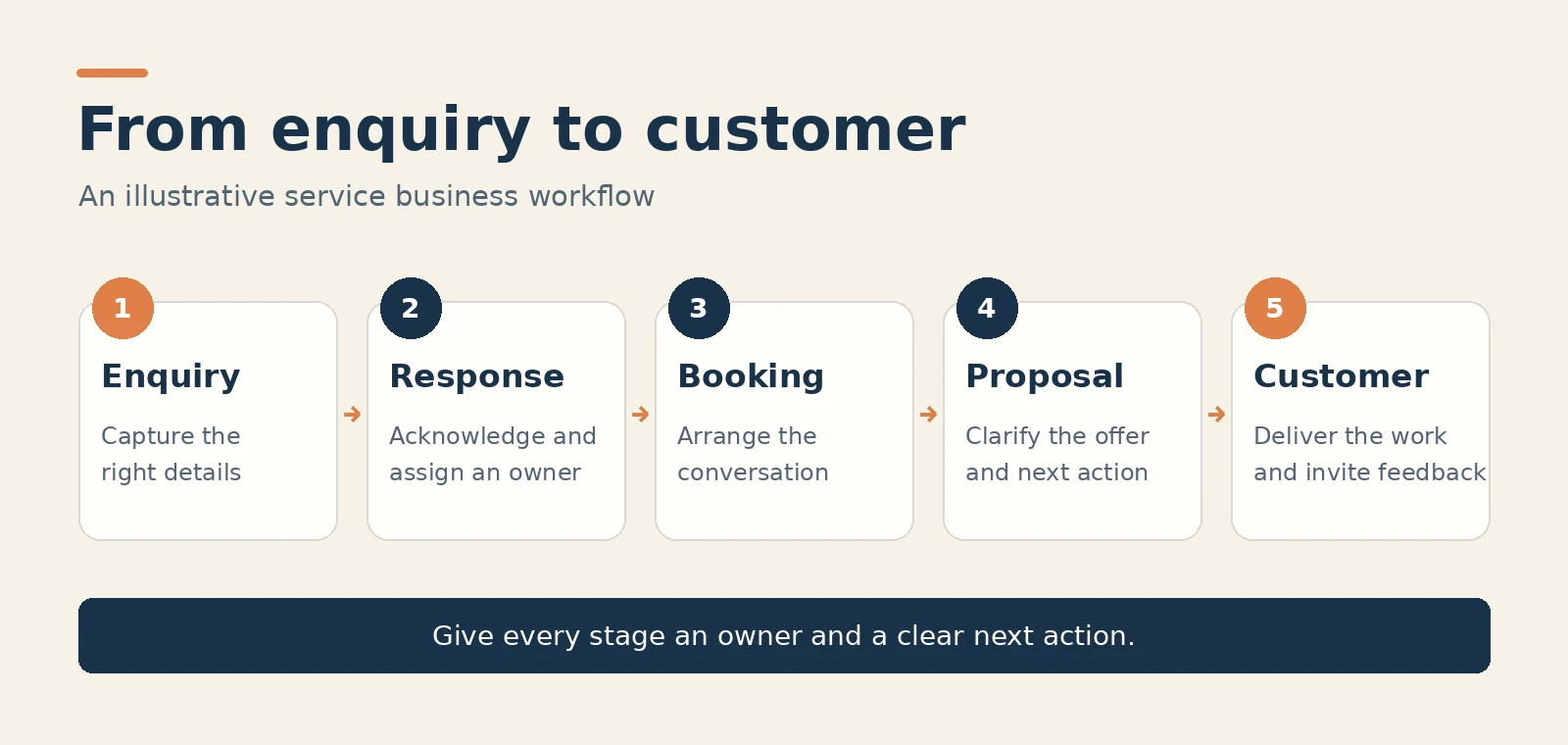
- The enquiry arrives. A homeowner completes a form with the project location, service required and a preferred contact method.
- The business acknowledges it. A configured workflow sends a relevant confirmation and assigns the enquiry to the person responsible.
- The consultation gets booked. The customer receives a suitable booking option, and reminders help everyone prepare for the meeting.
- The opportunity progresses. The team updates the pipeline as the consultation takes place, the proposal is sent and the decision is made.
- The relationship continues. After the work is completed, the business can invite feedback and maintain appropriate contact with the customer.
Now test the journey as a homeowner. Submit the form, read the confirmation and try to book a suitable appointment. Then check the team’s view. The person taking the consultation should have the details already provided and a clear next task.
This is where the system becomes useful to evaluate. A high number of enquiries with few bookings suggests a different problem from plenty of consultations with few accepted proposals. Follow the stages and you can ask a much more precise question.
The same approach can support a consultancy
For a consultant, the starting point might be a useful article or webinar. A reader asks for more information and explains a problem they want to solve. Your process needs to help that person decide whether a conversation would be worthwhile.
The form can gather the context for that discussion. A relevant email can explain what the consultation covers. The booking page can set expectations. After the meeting, the pipeline can show whether the next step is a proposal, another discussion or a later check in.
Keep the sequence connected to the original interest. If someone asked about a specific service, their next message should help them understand that service. The consultant can then spend the meeting on the questions that need expertise.
Reconnecting with enquiries that have gone quiet
Some prospects go quiet because their timing changes. A project is postponed, approval takes longer or the budget is still being arranged. Your database may contain relevant conversations that deserve another thoughtful look.
Use contact filters and workflows to identify a meaningful group. Decide what has changed, why a message would be helpful now and what response you want to invite. Follow the person’s permission and communication preferences.
For example, a consultant could contact people who previously asked about a service with an answer to a common planning question. If appropriate, the message can offer a conversation about their current circumstances. Refer naturally to the interest they already expressed.
Treat this as a continuation of an existing conversation. Relevance gives the recipient a reason to pay attention and the team a clearer reason to follow up. HighLevel’s role is to help organise the audience, timing and next action.
GoHighLevel for agencies: Accounts, Snapshots and SaaS Mode
An agency needs to deliver good work repeatedly. If every client runs on a different collection of tools and undocumented processes, routine support consumes time that could go into strategy and improvement.
GoHighLevel’s agency features deserve attention because they let you organise several client businesses within a consistent delivery structure. You can standardise the parts that repeat and adapt the details that make each client different.

Separate subaccounts organise client work
Subaccounts give each client business a separate working environment within the agency structure. Your team can organise contacts, pipelines, calendars and workflows around the relevant business. That becomes increasingly useful as the number of accounts grows.
The base subscription allocation is easy to illustrate. Divide the $297 Unlimited subscription across ten active locations and the allocation is $29.70 per location. Your service price still needs to cover usage, selected AI subscriptions, setup, support and other costs.
Look beyond that allocation when planning delivery. Document how your team names stages, assigns contacts and checks the account. A consistent structure gives new staff a reference point and makes client onboarding easier to explain.
Snapshots help you reuse a well built setup
Snapshots copy selected configuration assets between accounts. Supported assets can include workflows, forms, funnels, calendars and other elements. This gives an agency a reusable starting point for a familiar type of project.
Suppose your agency serves home services companies. You could refine a quote request journey, prepare its contact fields and messages, and reuse the supported structure for another client. Each new setup begins with work you have already thought through.
Allow time to reconnect the client’s domains, communication services and integrations. Snapshots transfer configuration; live customer records need their own data process. Review the copied content before activating it for a new business.
The strongest use of a Snapshot is to preserve a considered approach. A consultancy may ask different questions from an installation company, and each client has its own offer and responsibilities. Keep the reusable structure useful by adapting those details.
SaaS Mode creates scope for an ongoing offer
Agency Pro’s SaaS Mode supports selling access to the platform and automatically creating client accounts. You can build an offer that combines software access with implementation, training and ongoing help.
For a website agency, that could mean a package covering the enquiry form, CRM pipeline, booking process and monthly workflow support. The client can see how the service connects to the business activity their website starts.
Define the package before setting the price. Explain what you configure, what the client’s team manages, how support works and which usage costs are included. That makes the offer easier to buy and easier for your team to deliver.
The ongoing work should be visible. Someone needs to check the workflows, update service information, help users and review the customer journey. Those responsibilities give a recurring service a practical basis.
| Service element | What the client receives |
|---|---|
| Enquiry handling. | A defined route from website or campaign interest into contact records and assigned next actions. |
| Booking and preparation. | A relevant calendar, confirmations and information that helps the consultation happen. |
| Communication support. | Messages and follow up paths that match the service and stage of the conversation. |
| Ongoing review. | Regular attention to records, workflow performance, customer questions and agreed improvements. |
This is one of the strongest reasons for a digital agency to examine GoHighLevel. You can extend the relationship beyond a website launch or campaign into the systems the client uses every day. The scope is clear enough to price, deliver and review.
For an agency, the next step is to choose one client type and map the service you could deliver repeatedly. Use the trial to develop that first enquiry journey, then decide how setup, training and ongoing support fit into your offer.
Is GoHighLevel worth the cost?
Start with the problem you want to improve, then calculate the complete cost of the setup that addresses it. Include the subscription, expected usage, optional products and the time required to build and operate the process.
Next, define what would make the investment worthwhile. That could be better handling of existing enquiries, less coordination work or a repeatable client service. For additional sales, use contribution after direct delivery costs so the calculation reflects the value the business actually keeps.
A simple budgeting example
Here is a simple budgeting exercise. Assume a service business allows $200 a month for its complete configured system. If each additional completed job contributes $150 after direct delivery costs, two additional jobs would contribute $300 against that assumed $200 system budget.
| Illustrative input | Amount |
|---|---|
| Assumed monthly system budget. | $200. |
| Contribution from each additional completed job. | $150. |
| Additional jobs needed to cover the assumed budget. | Two. |
| Contribution from two jobs before subtracting that system budget. | $300. |
Those assumptions illustrate the calculation and do not forecast product results. Substitute your own costs and contribution figures. Also check whether the team has enough demand and delivery capacity for the improvement you are considering.
Include the operational work in the calculation
An agency should include delivery time in the comparison. How many hours go into maintaining separate setups, answering the same questions and finding client information? Examine whether a common approach changes that workload before setting your margin.
For a local business, the evaluation can stay focused. Can the team find every new enquiry? Does each one have an owner? Can a customer arrange the next conversation easily? Does the follow up happen as intended? Use the trial to answer those questions.
That gives the price a useful context. You can judge the complete system against a defined business need, with a clearer view of both the potential benefit and the work required to operate it.
Can you use GoHighLevel with WordPress?
Yes, GoHighLevel can work with WordPress. The LeadConnector WordPress plugin supports functions including forms, surveys, calendars and chat. HighLevel also provides options for embedding forms on external websites.
If you already have a WordPress site that serves your business well, you can connect the relevant HighLevel assets to it. That lets you develop the CRM and response process while keeping your established publishing workflow.
Test the integration from both sides. Confirm the form displays correctly on mobile, the submission reaches the right account, the necessary fields are recorded and the next workflow action runs. Also check how the form behaves after a visitor submits it.
The project has a clear outcome: a visitor can take action on the website, and the team can handle that action inside the CRM. Check that complete journey before sending campaign traffic to it.
This approach also gives the team time to learn the platform in stages. You can begin with an enquiry form, pipeline and calendar, then decide which additional features solve a real need.
For an agency already building WordPress websites, this is a natural service extension. The website project establishes the offer and presentation. The connected CRM process helps the client handle the conversations that follow.
What do GoHighLevel users say about support?
HighLevel’s Trustpilot profile showed 4.9 out of 5 from 15,248 reviews when checked on 16 October 2026. Several recent reviews describe helpful support with onboarding and technical questions.
That is an encouraging external signal when you are considering a broad platform. Read recent reviews for situations similar to yours, then use the trial to ask specific questions about your planned setup. The score reflects customers’ reported experiences and changes as reviews are added.
GoHighLevel pros and cons: What to expect
GoHighLevel’s main advantage is the breadth of a connected toolkit. To benefit from that breadth, you need a defined process and someone responsible for maintaining it. The following tradeoffs are useful to consider before buying.
| Advantage | Tradeoff to consider |
|---|---|
| CRM, booking, communication and automation in one platform. | The breadth takes time to learn. Start with a defined journey and assign an owner. |
| Agency subaccounts and reusable Snapshots. | Each client still needs configuration, service connections and content checks. |
| Unlimited contacts and users on the main plans. | Communication usage and optional products can raise the complete monthly cost. |
| AI tools for defined conversational tasks. | Useful responses require accurate information, testing and a clear route to a person. |
| Options to work with an existing website. | Forms, tracking and workflow actions need testing on your actual site. |
These are manageable decisions when the platform fits your work. Start with a focused setup, allow time for the team to learn it and expand around demonstrated needs. For an agency, include that implementation and support work in the service you sell.
GoHighLevel alternatives: HubSpot, ActiveCampaign and ClickFunnels
The best alternative depends on the work you want the platform to do. Use these distinctions to build a shortlist, then compare the specific plans, integrations and costs required for your process.
| Platform | Main comparison focus | When GoHighLevel deserves particular attention |
|---|---|---|
| HubSpot | Its CRM and wider sales, marketing and service product ecosystem. | You want connected acquisition tools alongside an agency account structure. |
| ActiveCampaign | Marketing automation, audience segmentation and campaign journeys. | You also need booking, funnels and client account management in the same operating approach. |
| ClickFunnels | Funnel creation and online selling. | Your requirements extend into ongoing CRM processes, communication and agency delivery. |
For GoHighLevel, the agency structure is a major part of the argument. If you manage several client businesses and want CRM, communication, booking and automation available together, evaluate the whole delivery model. A comparison based only on one feature can miss that value.
How to make the most of a GoHighLevel trial
HighLevel advertises a standard 14 day trial. Give that trial a specific job: prove that your priority customer journey can work for the customer and the team.
- Choose one journey. Use a website enquiry, consultation booking or another customer action with a clear next step.
- Configure the essentials. Set up the contact fields, pipeline, calendar, communication settings and team responsibilities the journey needs.
- Test realistic situations. Try a new enquiry, a duplicate submission, a booking, a cancellation and a question that needs a person.
- Make a buying decision. Review the customer experience, staff workload, usage costs and features you would keep.
Keep a short record of what you learn. Note the steps that worked, the questions the team raised and the services that generated usage charges. You will finish with a more useful buying decision than you would get from exploring every menu.
Billing begins automatically after the trial unless you cancel. Communication and other usage charges can apply during the trial. Review your selected plan and current billing details before activating services.
A practical first month implementation plan
A focused rollout makes it easier for a team to build a working habit. Treat the following as an illustrative first month plan and adjust the timing to the complexity of your setup.
| Stage | Main focus |
|---|---|
| Week 1: Define the journey. | Choose the offer, enquiry source, next action and person responsible. Note the information your team needs. |
| Week 2: Build and test. | Connect the necessary services. Configure the form, pipeline, calendar and messages, then test the complete path. |
| Week 3: Establish daily use. | Train the team, check enquiries and resolve issues found during normal work. Keep the scope focused. |
| Week 4: Review and improve. | Examine records, costs, customer questions and team feedback. Choose the next change with a clear reason. |
Your first milestone can be simple: a new enquiry appears in the right place, receives useful information and has an assigned next action. Make that dependable before adding another journey. The team should understand how to use and maintain what you have built.
An agency can follow the same approach with a client. Agree the first deliverable, show the team how it works and confirm who owns each task. Then review actual use and propose the next improvement with a clear reason.
GoHighLevel review FAQs
Is GoHighLevel worth it for a small business?
GoHighLevel can be worth it for a small business that needs connected enquiry handling, messaging, booking and follow up. Starter is $97 monthly with three subaccounts. Assess the complete cost and use the trial to test one customer journey that matters to your business.
What is the difference between GoHighLevel and HighLevel?
GoHighLevel and HighLevel refer to the same platform. GHL is a common abbreviation you will see in tutorials, agency discussions and product communities.
Does GoHighLevel replace WordPress?
HighLevel includes a website builder and can also connect to an existing WordPress website. You can use its CRM, calendars and automation while keeping WordPress for your site. Choose the combination around your design, publishing and integration needs.
Does GoHighLevel include AI?
HighLevel offers AI tools including Conversation AI and Voice AI. Pricing depends on the product and coverage you select. AI Employee subscriptions are separate from the core platform subscription, with Growth at $50 and Unlimited at $97 monthly per enabled location.
Can an agency resell GoHighLevel?
Agency Pro includes SaaS Mode for selling platform access and automated client account creation. An agency can combine that access with setup, training and ongoing support. Define the service scope and usage charges clearly before selling the package.
Do you need to run an agency to use GoHighLevel?
No. A business can subscribe for its own use. Starter can suit a company building an enquiry and booking process. The higher plans add account capacity and agency capabilities that become relevant as your requirements grow.
Can you export contacts or cancel later?
HighLevel documents contact export to CSV and cancellation through agency billing. If another agency supplies your access, contact that agency about the subscription. Review your data, connected services and optional products before making a change.
Is GoHighLevel worth choosing in 2026?
GoHighLevel deserves a place on the shortlist when you want a more consistent path from enquiry to customer. Its CRM, booking, communication and automation tools give you the components to build that path around the way your business sells.
For agencies, the account structure, Snapshots and SaaS Mode create scope for a repeatable service with ongoing responsibilities. For consultants and local businesses, the immediate opportunity is to give current enquiries a clearer next step.
The buying decision becomes easier when you choose a real problem. You may need to organise quote requests, connect website enquiries to a calendar or give the team a shared view of proposals. Build the smallest useful version of that process.
Put that first journey together during the trial and involve the people who will use it. If your business already attracts enquiries and you want a more consistent way to handle them, GoHighLevel is a worthwhile next step to explore. Choose the plan that fits your current setup and give the trial a clear job to do.
About this review
This review is based on HighLevel’s public pricing and product documentation, selected public customer reviews and an editorial assessment of agency and service business workflows. Pricing and the cited Trustpilot score were checked on 16 October 2026. The workflow, budget examples and illustrations explain potential uses; they do not represent measured product results or a personal software test.
About the author: Wilson Okonjo is a web developer, product designer and founder of Palena Digital. His work focuses on websites, design and practical digital systems for businesses.
Have a project in mind?
Let’s discuss your next step ↗